On this page
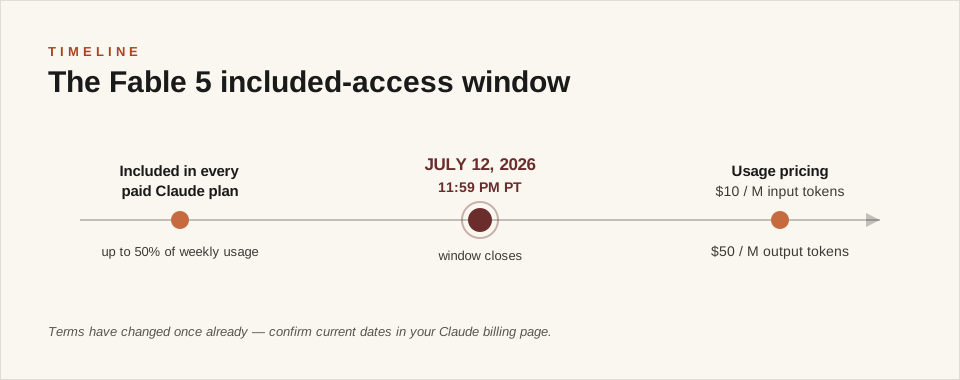
Quick answer: Claude Fable 5 is included in every paid Claude plan until July 12, 2026 at 11:59 PM PT — after that it moves to usage credits at $10 per million input tokens and $50 per million output tokens. The smartest way to spend the remaining window is not asking throwaway questions, but running prompts that build reusable assets: systems, templates, playbooks, and saved workflows you keep long after the free window closes. This guide gives you the 40 best Claude Fable 5 prompts for developers, automation builders, and agency operators — the Claude Code / n8n / GoHighLevel crowd — copy-paste master prompts organized into 8 categories, each engineered to produce something permanent.
⏰ Timing note (verify before you rely on it): Anthropic's included Fable 5 access on paid plans runs through July 12, 2026, 11:59 PM PT — extended from the original July 7 cutoff. During the window, Fable 5 is available for up to 50% of your weekly usage limit, after which you can switch to another model. After the deadline, Fable 5 is priced at $10 per million input tokens / $50 per million output tokens (with prompt-caching discounts). These rules have already changed once — confirm the current terms in your Claude billing page before planning around them.
On this page: What is Fable 5 · How to use it well · Last-24-hours triage · The 40 prompts: Claude Code & Dev / AI Agents & Skills / n8n & Automation / GHL & Client Systems / Agency Growth / Content & SEO / Data & Ops / Research & Strategy · Turn prompts into Skills · Common mistakes · FAQ
There are two kinds of people using Fable 5 right now: the ones asking it throwaway questions, and the ones building assets they keep forever. Fable 5 has been broadly available for about a month, and the gap between people who know how to prompt it and people who don't is already embarrassing. This is the most capable Claude model ever released, sitting in your existing subscription for roughly one more day. Here's your head start.
What Is Claude Fable 5?
Claude Fable 5 is the first model in Anthropic's Claude 5 family, positioned above Claude Opus in capability. Anthropic describes it as a Mythos-level model "built for your most ambitious, long-running projects" — the hardest knowledge work and coding problems. (Claude Mythos 5 is a sibling model that shares the same underlying model, available to approved organizations without Fable's additional dual-use safety measures.)
What actually matters for your prompting:
- 1M-token context window. You can load entire codebases, full document sets, or a whole quarter of business data into a single conversation.
- Adaptive thinking, always on. Fable 5 decides how hard to reason per task. You don't toggle it — you shape it with how you frame the goal.
- Goal-first prompting beats checklists. Fable 5 performs best when you give it an outcome, context, and constraints — then let it plan. Micro-managed step lists that helped older models often reduce its output quality.
- Long-horizon execution. It sustains multi-step work — research → draft → critique → revision — inside one prompt far better than previous models.
Claude Fable 5 vs Opus 4.8
Fable 5 is the stronger model for deep, multi-step work: complex refactors, long research synthesis, strategy documents that need internal consistency across thousands of words. Opus 4.8 remains excellent for everyday drafting and iteration, and after July 12 it stays included in paid plans while Fable moves to usage credits — which is precisely why the prompts below focus on work only Fable-class reasoning does well.
How to Use Claude Fable 5 for Maximum Output Quality
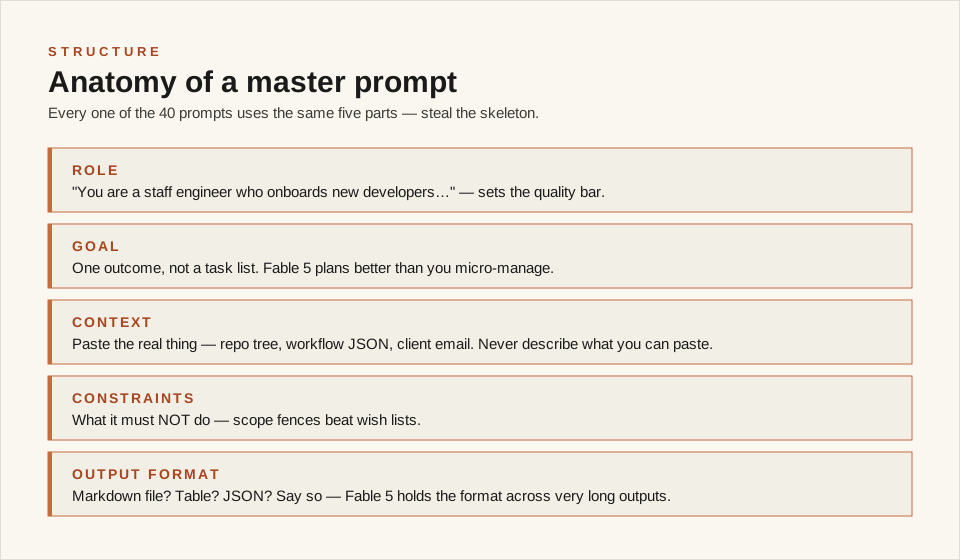
Knowing how to use Claude Fable 5 well comes down to one shift: prompt for outcomes, not steps. Every master prompt below follows the same skeleton. Steal it for your own prompts:
- Role framing. Open with who Claude is acting as — "You are a senior pricing strategist" outperforms "help me with pricing."
- GOAL before process. State the finished asset you want in one sentence. Fable 5 plans backward from goals.
- CONTEXT loading. Paste real material — your numbers, your code, your past posts. With a 1M context window, thin context is a self-inflicted wound.
- CONSTRAINTS as guardrails. Word counts, formats, tone, things to never do. Constraints sharpen output; vagueness dilutes it.
- PROCESS only where it earns its place. Give checkpoints ("draft, then critique your draft, then revise") rather than 20 micro-steps.
- OUTPUT FORMAT specified exactly. Markdown file? Table? JSON? Say so, and Fable 5 will hold the format across very long outputs.
One more habit that separates pros: end sessions by asking Fable 5 to convert what it built into a reusable template or Claude Skill. That's the whole thesis of this article — spend the window on assets, not answers.
What to Prioritize in Your Last 24 Hours
Not all 40 prompts are equal under a deadline. Triage:
| Priority | Run these first | Why |
|---|---|---|
| 🔴 Now | Claude Code & Dev (1–5), AI Agents & Skills (6–10) | Highest-impact assets; benefit most from Fable-class reasoning on big codebases |
| 🟠 Next | n8n & Automation (11–15), GHL & Client Systems (16–20) | Compounding assets — systems that run unattended for months |
| 🟡 Then | Agency Growth (21–25), Content & SEO (26–30) | Deep one-time builds worth doing at full strength |
| 🟢 If time | Data & Ops (31–35), Research & Strategy (36–40) | Valuable, but workable on other models later |
Rule of thumb: if a prompt's output is something you'll reuse weekly, it outranks anything you'd only read once.
The 40 Master Prompts
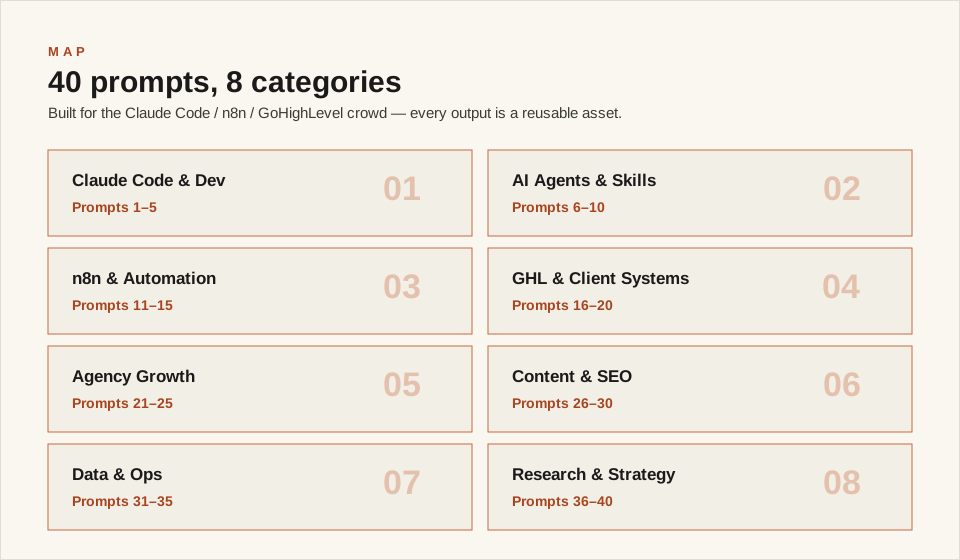
These are written for people who build: developers living in Claude Code, automation builders wiring n8n and webhooks, and freelancers/agencies running client systems on platforms like GoHighLevel. Every prompt card below is structured the same way: what it's best for, when to use it, the exact text to paste into Claude, what to expect back, and a jump to the next related prompt. Replace anything in [BRACKETS] with your own details, and paste real context wherever the prompt asks for it.
Claude Code & Dev Workflow
1. The CLAUDE.md Project Brief
Best for: Making every future AI coding session dramatically better. Use when: You have any codebase you'll work on with Claude again.
You are a staff engineer who onboards new developers onto codebases.

GOAL: Write the CLAUDE.md file for my project — the persistent brief that makes every future Claude Code session start with full context instead of zero.

CONTEXT: Here is my repository structure and key files: [PASTE `tree` OUTPUT + MAIN CONFIG FILES + README IF ANY]. Stack: [LANGUAGES/FRAMEWORKS]. How I run/test/deploy it: [COMMANDS]. Known gotchas and past mistakes: [LIST HONESTLY].

CONSTRAINTS: Only include facts that are always true — no session-specific state. Every command must be exactly runnable. Include a "never do this" section for the gotchas.

PROCESS: Draft it, then audit: would a fresh Claude session with only this file make the mistakes I listed? Patch until no.

OUTPUT FORMAT: A complete CLAUDE.md in markdown, under 150 lines, sections: Overview, Architecture, Commands, Conventions, Never Do.
Expect: A permanent project brief — every future session starts smarter. Arguably the highest-ROI 10 minutes in this article. Next step: Build something new with Prompt 2.
2. The Full App Scaffold
Best for: Going from idea to working skeleton in one session. Use when: Starting any tool, internal app, client demo, or MVP.
You are a senior full-stack engineer who ships pragmatic MVPs.

GOAL: Build a working scaffold of [APP IDEA] — running code, not a plan — with architecture I can extend for months.

CONTEXT: What it must do (v1 only): [3-5 CORE BEHAVIORS]. Users: [WHO]. My stack preference: [OR SAY "CHOOSE — JUSTIFY BRIEFLY"]. Where it will run: [LOCAL/VERCEL/VPS].

CONSTRAINTS: Boring, proven technology. No feature beyond the listed behaviors. Every file complete and runnable — no "// implement later" stubs in the core path. Include setup instructions that work from a fresh machine.

PROCESS: Confirm architecture in 5 lines, then write every file, then walk through the primary user flow verifying each step exists in code.

OUTPUT FORMAT: File tree, then each file in a labeled code block, then README with run instructions.
Expect: A runnable skeleton with real architecture — extendable on cheaper models once the foundation is right. Next step: Protect it with Prompt 3.
3. The Test-Suite Generator
Best for: Retrofitting confidence onto code that has zero tests. Use when: You have working code you're afraid to change.
You are a QA engineer who writes tests that catch real regressions, not vanity coverage.

GOAL: Build a test suite for my code that lets me refactor without fear, plus a testing-conventions doc so future tests stay consistent.

CONTEXT: Here is the code: [PASTE MODULES — USE THE 1M CONTEXT WINDOW]. How it's used in production: [DESCRIBE]. Past bugs that actually happened: [LIST — THESE BECOME REGRESSION TESTS].

CONSTRAINTS: Prioritize: past bugs first, then money/data-touching paths, then edge cases. No tests that just mirror the implementation. Each test name describes the behavior it protects.

PROCESS: Map the risk surface, write tests in priority order, then state what remains untested and why.

OUTPUT FORMAT: Test files in code blocks, run instructions, coverage gaps list, and a short TESTING.md conventions doc.
Expect: A risk-ordered suite plus conventions doc — the "past bugs as tests" section pays for itself the first refactor. Next step: Take on the scary codebase with Prompt 4.
4. The Legacy Refactor Battle Plan
Best for: Refactors big enough that "just start" means "just break production." Use when: Technical debt is slowing every feature and nobody dares touch it.
You are a principal engineer who has led large refactors without stopping the ship.

GOAL: Produce my refactor battle plan for [CODEBASE/MODULE]: sequenced phases, each independently shippable and revertible, with risk controls per phase.

CONTEXT: The code: [PASTE — LOAD AS MUCH AS FITS IN THE 1M WINDOW]. What hurts today: [SPECIFIC PAIN]. What must never break: [CRITICAL PATHS]. Test coverage reality: [HONEST]. Time budget: [X HOURS/WEEK].

CONSTRAINTS: No big-bang rewrite. Every phase leaves the system working and deployable. Phase 1 must be startable today and take under a day. Include a "stop here and it was still worth it" marker per phase.

PROCESS: Map the dependency structure first, identify the seams, then sequence phases from safest to deepest.

OUTPUT FORMAT: Dependency map (text), phased plan table (phase, scope, risk, revert path, done-condition), and the Phase 1 task list.
Expect: A refactor you can actually start — the shippable-phase discipline is what separates this from every abandoned rewrite. Next step: Audit before you ship with Prompt 5.
5. The Pre-Ship Code Audit
Best for: Finding the bugs and security holes before users do. Use when: Before any deploy, client handoff, or "why is this slow" moment.
You are a principal engineer performing a pre-ship audit. You are skeptical by default.

GOAL: Audit my codebase and produce two assets: the findings report AND the reusable audit checklist tuned to my stack, so every future project gets the same scrutiny.

CONTEXT: Code: [PASTE — LOAD AS MUCH AS FITS]. Stack: [DETAILS]. What it handles: [USER DATA? PAYMENTS? AUTH? API KEYS?]. My biggest worry: [HONEST ANSWER].

CONSTRAINTS: Findings ranked by severity with the exact file/line and a concrete failure scenario for each — no vague "consider improving." Separate MUST-FIX from nice-to-have. Check: secrets in code, injection, auth gaps, error swallowing, performance traps.

PROCESS: Sweep by category, verify each finding is real (not stylistic), then compile.

OUTPUT FORMAT: Severity-ranked findings table, fix-order list, and the blank AUDIT-CHECKLIST.md for reuse.
Expect: A real findings report plus your permanent pre-ship checklist. Next step: Make Claude itself an asset — Prompt 6.
AI Agents & Claude Skills
6. The Agent System-Prompt Architect
Best for: Subagents and AI assistants that behave consistently instead of drifting. Use when: Building any agent — Claude Code subagent, support bot, n8n AI node, custom GPT.
You are an expert in designing system prompts for production AI agents.

GOAL: Write the production system prompt for my agent: [AGENT PURPOSE — E.G. "TRIAGES CLIENT EMAILS", "REVIEWS PRs", "QUALIFIES LEADS"] — plus a test set to verify it behaves.

CONTEXT: Exact job: [WHAT IT DECIDES/PRODUCES]. Inputs it receives: [FORMAT + REAL EXAMPLES — PASTE 3-5]. Hard rules it must never break: [LIST]. Failure examples from my current version if any: [PASTE THE BAD OUTPUTS].

CONSTRAINTS: The prompt must handle every pasted example correctly. Ambiguous inputs get an explicit escalation path, never a guess. Output format locked and machine-parseable if downstream automation consumes it. No personality filler.

PROCESS: Draft the prompt, run my pasted examples through it mentally showing expected outputs, patch failures, then write 10 test cases including 3 adversarial ones.

OUTPUT FORMAT: The system prompt in a code block, the test table (input → expected output), and deployment notes.
Expect: A deployable system prompt plus its regression tests — treat agent prompts like code, because they are. Next step: Package repeated workflows with Prompt 7.
7. The Claude Skill Factory
Best for: Converting any workflow you've done twice into a one-command skill. Use when: You keep re-explaining the same procedure to Claude every session.
You are a Claude Code skills engineer.

GOAL: Convert the workflow I describe into a complete, correct SKILL.md I can drop into ~/.claude/skills/ — so this becomes a one-command procedure forever.

CONTEXT: The workflow, exactly as I do it: [DESCRIBE EVERY STEP, TOOLS, FILE PATHS, THINGS THAT WENT WRONG BEFORE]. When I want it to trigger: [PHRASES I'D NATURALLY SAY]. Inputs that change each run: [LIST].

CONSTRAINTS: Frontmatter with name + description containing STRONG trigger phrases so auto-invocation actually fires. Steps must be executable without this conversation's context. Bake in every gotcha I listed as a hard rule. Windows paths if I gave Windows paths.

PROCESS: Draft the skill, then simulate a fresh session invoking it with only the skill text — patch anything that would fail.

OUTPUT FORMAT: The complete SKILL.md in one code block, plus a 3-line install note.
Expect: A workflow that survives the free window — this is the purest version of the "assets not answers" thesis in this article. Next step: Systematize all your prompts with Prompt 8.
8. The Prompt Library with Eval Harness
Best for: Teams/solo operators whose prompts live in random notes and chat history. Use when: You reuse prompts but never know which version was the good one.
You are a prompt engineer who treats prompts as versioned, tested assets.

GOAL: Organize my scattered prompts into a structured library — each prompt cleaned, parameterized, and paired with a lightweight eval — plus the template for adding new ones.

CONTEXT: My prompts, pasted raw: [DUMP THEM ALL — DUPLICATES AND BROKEN ONES INCLUDED]. What I use them for: [CONTEXTS]. Where the library will live: [REPO/NOTION/FILES].

CONSTRAINTS: Each entry: name, purpose, the prompt with [PARAMETERS] marked, a 3-case eval (typical, edge, adversarial input + what good output looks like), and version notes. Merge duplicates, kill dead ones — show me what you cut and why.

PROCESS: Inventory and cluster, clean and parameterize, write evals, then compile.

OUTPUT FORMAT: The library as organized markdown, a CUTS section with reasoning, and the blank entry template.
Expect: Your prompt chaos converted into a versioned library — the eval column is what makes future model migrations painless. Next step: Coordinate multiple agents with Prompt 9.
9. The Multi-Agent Orchestration Design
Best for: Work too big for one context window — audits, migrations, content fleets. Use when: You're about to do something 20 times manually that agents could fan out.
You are an AI systems architect who designs multi-agent workflows.

GOAL: Design the multi-agent orchestration for [TASK — E.G. "AUDIT 40 CLIENT SITES", "MIGRATE 200 POSTS", "REVIEW EVERY MODULE"]: decomposition, agent briefs, and the verification layer that catches agent errors.

CONTEXT: The full task: [DESCRIBE + VOLUME]. What one unit of work looks like: [ONE EXAMPLE DONE WELL]. Tools agents have: [CLAUDE CODE/API/N8N]. What's gone wrong with automation before: [HONEST].

CONSTRAINTS: Every agent brief must be self-contained (no shared conversation memory). Include a verification stage — agent outputs get checked, not trusted. Define what happens on partial failure. Budget-conscious: state which stages need the big model and which don't.

PROCESS: Decompose, write one complete agent brief as the template, design the verify/merge stage, then the failure playbook.

OUTPUT FORMAT: Pipeline diagram (text), the template agent brief, verification checklist, failure playbook.
Expect: An orchestration blueprint with verification built in — the "check, don't trust" layer is what separates fleets that work from expensive chaos. Next step: Give every deliverable a quality gate with Prompt 10.
10. The Critic Gate Builder
Best for: Catching bad work before clients do — without trusting self-grading. Use when: Anything you ship (code, content, sites) goes out reviewed only by the person who made it.
You are a quality-systems designer who builds LLM-as-judge review gates.

GOAL: Build my critic gate for [DELIVERABLE TYPE — E.G. CLIENT SITES, ARTICLES, AUTOMATIONS]: the rubric, the judge prompt, and the pass/fail protocol — so nothing ships on the maker's own opinion.

CONTEXT: What I ship: [DESCRIBE]. Past failures that got through: [REAL EXAMPLES — THESE BECOME RUBRIC ITEMS]. What a client complaint costs me: [STAKES]. Here's a sample deliverable to calibrate on: [PASTE ONE].

CONSTRAINTS: The judge must default to FAIL on uncertainty — false pass costs more than false block. Rubric items must be checkable, not vibes ("all links resolve" not "good UX"). Reasons before scores. The maker never grades their own work — the judge prompt runs in a fresh session.

PROCESS: Convert my past failures into rubric items, design the judge prompt, then run my pasted sample through it as demonstration.

OUTPUT FORMAT: Rubric table, judge prompt in a code block, pass/fail protocol, and the graded sample.
Expect: An independent quality gate — run it before anything billable leaves your machine. Next step: Point Fable at your automation stack — Prompt 11.
n8n & Workflow Automation
11. The n8n Workflow Spec
Best for: Building automations that are designed, not improvised node-by-node. Use when: Any new n8n (or Make/Zapier) workflow beyond two nodes.
You are an n8n automation architect.

GOAL: Design my workflow for [AUTOMATION — E.G. "EMAIL TRIAGE → CRM → SLACK DIGEST"] as a build-ready spec: trigger, every node configured, data mapping, and error handling — so building it is mechanical.

CONTEXT: The process today, manually: [EXACT STEPS + TOOLS + ACCOUNTS]. Volume: [X/DAY]. Systems to connect: [APPS + WHAT AUTH I HAVE]. Edge cases that have bitten me: [LIST].

CONSTRAINTS: Fail loudly — every error path ends in a notification to me, never a silent skip. Handle my listed edge cases explicitly. Idempotent where retries are possible (no double-sends). Prefer core nodes over community nodes unless justified.

PROCESS: Propose the flow, walk each edge case through it node by node, then finalize.

OUTPUT FORMAT: Flow diagram (text), node-by-node configuration table (node, type, key settings, data mapping), error-handling matrix, test plan with 3 scenarios.
Expect: A blueprint you can build in one sitting — the error-handling matrix is what separates automations that run for years from ones that rot in a week. Next step: Fix the automations you already have with Prompt 12.
12. The Error-Handling Retrofit
Best for: The workflows currently failing silently at 3am. Use when: You discover an automation has been broken for a week and nobody knew.
You are a reliability engineer for workflow automations.

GOAL: Audit my existing workflow(s) for every silent-failure mode and produce the retrofit plan: what to add where, plus my standard error-handling pattern for all future builds.

CONTEXT: The workflow(s): [PASTE THE n8n JSON EXPORT / MAKE BLUEPRINT / SCRIPT]. What they handle: [BUSINESS IMPACT IF THEY FAIL]. How I currently find out about failures: [HONEST — USUALLY "THE CLIENT TELLS ME"].

CONSTRAINTS: Every failure mode gets: detection, notification (to where), and a retry-or-quarantine decision. No error may terminate silently. Include a weekly "is it alive" heartbeat check. Rank fixes by blast radius.

PROCESS: Trace each node's failure modes, map current coverage (usually none), then design the retrofit in priority order.

OUTPUT FORMAT: Failure-mode table (node, what breaks, current behavior, fix), the retrofit task list, and my reusable ERROR-STANDARD.md.
Expect: A failure map plus a standard you apply to every future workflow — silent failure is the automation killer, this ends it. Next step: Connect anything to anything with Prompt 13.
13. The API Integration Blueprint
Best for: Integrating with APIs that have docs written by their worst enemy. Use when: A workflow needs a service with no native node/connector.
You are an integration engineer who reads API docs so others don't have to.

GOAL: Produce my integration blueprint for [SERVICE/API]: auth flow, the exact endpoints and payloads for my use case, rate-limit strategy, and working request examples — plus a gotchas file for future me.

CONTEXT: What I need to do: [OPERATIONS — E.G. "CREATE CONTACTS, POST MESSAGES, FETCH REPORTS"]. Here are the API docs: [PASTE THE RELEVANT DOC PAGES — USE THE 1M WINDOW]. My environment: [n8n HTTP NODE / PYTHON / NODE]. Auth I have: [KEY TYPE].

CONSTRAINTS: Every request example complete and copy-runnable (headers, body, real field names from the docs). Flag every trap you find in the docs: pagination quirks, rate limits, undocumented required fields, timezone handling. If the docs are ambiguous, say so — don't invent endpoints.

PROCESS: Extract what matters from the pasted docs, map my operations to endpoints, write examples, compile gotchas.

OUTPUT FORMAT: Auth setup, operation → endpoint table, full request examples per operation, GOTCHAS.md.
Expect: The integration pre-chewed — the gotchas file saves the next project on this API entirely. Next step: Make the AI nodes inside your workflows smarter — Prompt 14.
14. The AI-Node Prompt Pack
Best for: The AI steps inside automations — classification, extraction, drafting — that must work unattended. Use when: An n8n/Make AI node produces output a human never reviews before it acts.
You are a prompt engineer specializing in unattended AI steps inside automations.

GOAL: Write the production prompts for the AI nodes in my workflow: [LIST THE AI STEPS — E.G. "CLASSIFY EMAIL URGENCY", "EXTRACT INVOICE FIELDS", "DRAFT REPLY"] — each with structured output and failure handling.

CONTEXT: Real input samples per step: [PASTE 5+ INCLUDING WEIRD ONES]. What downstream nodes expect: [EXACT FIELDS/FORMAT — JSON SCHEMA IF YOU HAVE IT]. Cost sensitivity: [WHICH MODEL TIER RUNS THIS].

CONSTRAINTS: Output must be strictly machine-parseable — JSON with a fixed schema, no prose wrapper. Every prompt needs an explicit "can't determine" escape value so ambiguity never becomes a confident wrong answer. Prompts sized for the model tier that runs them, not for Fable.

PROCESS: Per step: draft prompt, run my samples through it showing expected JSON, patch failures, add 2 adversarial tests.

OUTPUT FORMAT: Per step: the prompt, output schema, test table. Then a shared conventions note.
Expect: AI nodes that behave like software — the "can't determine" escape hatch prevents the confident-nonsense failures that kill trust in automation. Next step: Decide what to automate next with Prompt 15.
15. The Automation Triage Audit
Best for: Choosing the next automation by ROI instead of by what looks fun. Use when: Everything feels automatable and you don't know where to start.
You are an operations consultant who identifies automation ROI honestly — including the automations NOT worth building.

GOAL: Audit my recurring work and rank every automation candidate by real ROI — build cost, maintenance cost, failure risk, time saved — with a verdict per item: build now / build later / never automate.

CONTEXT: My recurring tasks, brain-dumped: [EVERYTHING REPETITIVE YOU DO, WITH ROUGH TIME PER WEEK EACH]. My stack: [TOOLS I ALREADY RUN]. My build skill: [HONEST]. Hourly value of my time: [RATE].

CONSTRAINTS: Maintenance cost counts — an automation that breaks monthly is a liability, not an asset. "Never automate" is a required category (judgment calls, relationship touchpoints). Each "build now" gets a one-line spec and effort estimate.

PROCESS: Cluster the tasks, score each candidate on the four factors, rank, then sanity-check the top 3 against my actual skill level.

OUTPUT FORMAT: Ranked table (task, hours saved/month, build effort, maintenance risk, verdict), top-3 one-line specs, and the "never automate" list with reasons.
Expect: An honest build queue — the "never automate" list saves you more than the automations do. Next step: Put your client systems on rails — Prompt 16.
GHL & Client Systems
16. The GHL Funnel & Pipeline Spec
Best for: Client funnels designed on paper before you touch the builder. Use when: Setting up any GoHighLevel (or similar CRM) funnel, pipeline, or campaign.
You are a CRM automation consultant who designs funnels clients can actually run.

GOAL: Design the complete GHL setup for [CLIENT/OFFER]: pipeline stages, automation triggers, forms, calendars, and follow-up campaigns — as a build checklist I execute top to bottom.

CONTEXT: The business: [WHAT THEY SELL + PRICE POINT]. Lead sources: [WHERE LEADS COME FROM]. Current follow-up process: [HONEST, USUALLY "OWNER'S MEMORY"]. What counts as a won deal: [DEFINITION].

CONSTRAINTS: Every pipeline stage needs an exit condition — no stages where leads rot. Every automation lists its exact trigger and failure behavior. Follow-up sequences capped at what the client will actually maintain. Flag anything needing API/webhook work beyond native features.

PROCESS: Map the lead journey first, then stages, then automations per stage, then the build order.

OUTPUT FORMAT: Pipeline diagram (text), stage table (name, entry, exit, automation), campaign outlines, and the sequenced build checklist.
Expect: A funnel spec the client understands and you can build in one sitting — the exit-condition rule kills the pipeline-graveyard problem. Next step: Feed it content with Prompt 17.
17. The Social Content Engine
Best for: Cross-platform posting that runs on a system, not on motivation. Use when: You (or a client) need consistent social presence without daily invention.
You are a social content systems designer for technical founders and agencies.

GOAL: Build my content engine: pillar topics, per-platform formats, a 30-day queue, and the repurposing rules that turn one asset into a week of posts — plus the scheduler-ready output format.

CONTEXT: The brand: [WHO + WHAT IT SELLS]. Platforms: [LIST]. Proof bank: [REAL WINS, PROJECTS, NUMBERS I CAN SHOW]. Posting capacity honestly: [X/WEEK]. Scheduler: [GHL/BUFFER/MANUAL].

CONSTRAINTS: Every post maps to a job: authority, trust, sell, engage. No invented metrics or fake claims — proof posts use only the pasted material. Formats native per platform, not cross-posted copies. Output must match my scheduler's import format [CSV COLUMNS IF KNOWN].

PROCESS: Define pillars from the proof bank, build the repurposing map, generate the 30-day queue, format for the scheduler.

OUTPUT FORMAT: Pillar doc, repurposing rules, 30-day content table (date, platform, hook, format, job), scheduler-ready rows.
Expect: A month queued plus the rules to regenerate every month after — the repurposing map is the permanent asset. Next step: Onboard clients without chaos — Prompt 18.
18. The Client Onboarding System
Best for: The gap between "signed" and "working" where projects go to die. Use when: Every new client starts with two weeks of access-chasing and scope amnesia.
You are an agency operations designer.

GOAL: Build my client onboarding system: intake form, access checklist, kickoff agenda, and the first-week execution plan — as templates I reuse on every signing.

CONTEXT: What I deliver: [SERVICES]. What I always end up chasing: [ACCESS/ASSETS/DECISIONS — LIST FROM PAINFUL MEMORY]. Tools involved: [GHL/HOSTING/DOMAINS/AD ACCOUNTS ETC]. Where past onboardings went wrong: [HONEST].

CONSTRAINTS: The client does the minimum possible work, in one sitting, with exact instructions per item (including where to click for API keys and access grants). Every credential request explains why it's needed. Include the "we can't start until" blocker list shown to the client upfront.

PROCESS: Build the intake form, then the access checklist with per-item instructions, then kickoff agenda, then week-one plan.

OUTPUT FORMAT: Intake form (fields + validation), access checklist with instructions, kickoff agenda, week-one task plan.
Expect: Signed-to-started compressed from weeks to days — the per-item access instructions eliminate 80% of the back-and-forth. Next step: Capture and warm the leads with Prompt 19.
19. The Lead Magnet & Nurture Build
Best for: Turning traffic into a list and a list into booked calls. Use when: You have attention (posts, profile visits) but nothing to capture it.
You are a funnel copywriter for technical service businesses.

GOAL: Build my complete lead capture asset: the lead magnet itself (outlined + written), the delivery mechanism, and the nurture sequence that follows — ready to wire into my CRM.

CONTEXT: Audience: [WHO + WHAT THEY STRUGGLE WITH]. What I sell after the magnet: [OFFER + PRICE]. My proof: [REAL RESULTS ONLY]. Delivery constraint: [E.G. PINNED COMMENT LINK, EMAIL GATE — NO ENGAGEMENT-BAIT MECHANICS].

CONSTRAINTS: The magnet must solve one real problem completely in under 15 minutes of the reader's time — a tool, checklist, or template beats an ebook. Nurture: 4 emails, value-first, one clear pitch at the end. Every email survivable standalone. Match my voice: [PASTE SAMPLE].

PROCESS: Pick the magnet format against my audience's problem, write it, then the delivery step, then the sequence.

OUTPUT FORMAT: The lead magnet in full, delivery setup note, 4 nurture emails, and the CRM wiring checklist (tags, triggers, delays).
Expect: A working capture-to-call funnel — the magnet is a real asset your audience keeps, which is why it converts. Next step: Prove your work monthly with Prompt 20.
20. The Client Reporting Automation
Best for: The monthly client report that writes itself from real numbers. Use when: Reporting day costs you hours per client, or worse — you skip it.
You are a reporting-automation specialist for agencies.

GOAL: Turn my manual client reporting into a system: report template, the data pipeline feeding each section, and the rerun-prompt that generates the narrative each month.

CONTEXT: A recent report I sent: [PASTE ONE]. Where each number lives: [GHL/ANALYTICS/AD PLATFORMS/SPREADSHEET]. What clients actually ask about: [THEIR REAL QUESTIONS]. Time it costs today: [HOURS/CLIENT].

CONSTRAINTS: Numbers arrive by export or API — never hand-transcribed. Narrative states what changed, why, and what we're doing about it — not a restatement of the charts. Only real logged numbers; a metric we can't source gets dropped, not estimated. Consistent structure every month.

PROCESS: Dissect my pasted report into data vs narrative, wire the data layer, template the narrative, write the rerun-prompt.

OUTPUT FORMAT: Report template, per-section data-source table, and the exact monthly rerun-prompt (the reusable asset).
Expect: Reporting cut to minutes per client — the rerun-prompt works on any model after the window closes. Next step: Package what you sell — Prompt 21.
Freelance & Agency Growth
21. The Productized Offer Architecture
Best for: Escaping custom-quote hell with fixed-scope, fixed-price offers. Use when: Every deal is bespoke and your margin depends on estimating well at midnight.
You are a pricing strategist for technical freelancers and small agencies.

GOAL: Design my productized offer ladder — 2-3 fixed-scope packages from my actual delivery capability — with pricing, scope boundaries, and the exact language to present them.

CONTEXT: What I've actually delivered: [LIST REAL PROJECTS + WHAT EACH TOOK IN HOURS]. Current pricing: [HOW I QUOTE TODAY]. Client objections I hear: [REAL ONES]. My floor: [MINIMUM VIABLE RATE].

CONSTRAINTS: Scope boundaries explicit enough to kill scope creep — every package lists what's NOT included. Middle package = the obvious choice. Frame value as client outcomes (time saved, revenue unblocked), never as my hours. Include the upgrade path between tiers.

PROCESS: Cluster my past projects into natural packages, price against value delivered, then stress-test each against my listed objections.

OUTPUT FORMAT: Offer ladder table, per-package one-paragraph pitch, NOT-included lists, objection responses, and discount rules.
Expect: Packages you can quote in one message — the NOT-included lists are where the margin lives. Next step: Close them with Prompt 22.
22. The Proposal Template
Best for: Proposals that close instead of ghost. Use when: You send custom proposals and win rate is under 50%.
You are a sales consultant who writes proposals that get signed.

GOAL: Build my reusable proposal template with the persuasion architecture baked in, then fill it for one real prospect I'm pitching now.

CONTEXT: My service: [WHAT]. Typical deal size: [RANGE]. The live prospect: [THEIR SITUATION, WHAT THEY SAID THEY WANT, IN THEIR WORDS]. Past proposals that won/lost: [PASTE IF AVAILABLE].

CONSTRAINTS: Their goals stated before my services — the proposal is about them. Three-option pricing with a recommended middle. Every deliverable has a done-definition. One page of substance beats ten of filler. Include validity deadline and exact next step.

PROCESS: Build the template, fill it for the prospect, then read it as the prospect's skeptical CFO and patch.

OUTPUT FORMAT: TEMPLATE with slot instructions, then the FILLED proposal ready to send.
Expect: A signed-faster proposal structure plus one ready to send today. Next step: Prove it worked with Prompt 23.
23. The Case Study Builder
Best for: Turning client wins into your most persuasive sales asset. Use when: You have results but they live in scattered emails and memory.
You are a case-study writer who turns project notes into proof.

GOAL: Write one complete case study from my raw project material, plus the interview-question set and template for producing every future one.

CONTEXT: The client and project: [WHO + WHAT YOU BUILT — SITE/AUTOMATION/SYSTEM]. Raw material: [PASTE EMAILS, BEFORE/AFTER NUMBERS, DELIVERABLES, ANY CLIENT QUOTES]. Who reads this: [FUTURE PROSPECT TYPE].

CONSTRAINTS: Only real, verifiable numbers — if a metric is missing, write [ASK CLIENT] instead of inventing. Structure: situation → obstacle → approach → result → client words. The reader must recognize their own situation in the opening.

PROCESS: Extract the story from the raw material, identify the missing pieces, write, then list what to request from the client.

OUTPUT FORMAT: The case study, a follow-up questions list, and the blank template + interview kit.
Expect: One publishable case study plus the machine for making more — with fabrication structurally prevented. Next step: Know exactly who you're up against — Prompt 24.
24. The Niche Competitor Teardown
Best for: Positioning your services against the agencies your prospects compare you to. Use when: Entering a niche or losing deals to a named rival.
You are a competitive intelligence analyst for service businesses.

GOAL: Build a reusable competitor-teardown template, then apply it to my top 3 competitors so I have both the filled analysis AND the blank template for future rivals.

CONTEXT: My positioning: [WHAT I SELL, TO WHOM, AT WHAT PRICE]. Competitors: [NAMES + URLS]. Their public material I've collected: [PASTE PAGES, PRICING, REVIEWS, PORTFOLIO ITEMS].

CONSTRAINTS: Only claims supported by the pasted material — mark anything inferred as INFERRED. Focus on exploitable gaps (slow delivery, no automation capability, template work sold as custom), not admiration.

PROCESS: Build the template first (positioning, pricing, proof, delivery model, weaknesses). Then fill per competitor. Then write a "where we win" synthesis.

OUTPUT FORMAT: Blank template + one filled teardown per competitor + a 5-bullet positioning brief I can paste into proposals and my site.
Expect: A permanent teardown template plus three filled analyses ending in concrete positioning language. Next step: Convert calls into scoped work — Prompt 25.
25. The Discovery-Call Converter
Best for: Turning a rambling discovery call into scope, quote, and follow-up — same day. Use when: Calls end warm and then die in your drafts folder.
You are a chief of staff for a technical consultant.

GOAL: Build my call-processing template — paste any discovery call transcript/notes, get back the scope summary, open questions, quote inputs, and the follow-up message — then run one real call through it.

CONTEXT: What I sell: [SERVICES + TYPICAL RANGES]. A real call: [PASTE TRANSCRIPT OR YOUR NOTES]. How I quote: [FIXED/PACKAGES/HOURLY].

CONSTRAINTS: Separate what they SAID they want from what they actually need (flag mismatches — that's where projects blow up). Every scope item maps to something they said. Unknowns become questions in the follow-up, not assumptions in the quote. Follow-up message ready to send, in plain text, my voice: [SAMPLE].

PROCESS: Build the extraction template, process the pasted call, draft the follow-up.

OUTPUT FORMAT: The reusable template, the processed call (scope, mismatches, questions, quote inputs), and the ready-to-send follow-up.
Expect: Same-day follow-ups with clean scope — the said-vs-need mismatch flag prevents the projects you'd regret winning. Next step: Get found by the people searching — Prompt 26.
Content & SEO for Tech Brands
26. The Pillar Article System
Best for: Ranking for the keywords your buyers actually search. Use when: You want a repeatable article production system, not one lucky post.
You are a senior SEO content strategist for technical brands.

GOAL: Build my reusable pillar-article production system: keyword-selection rules, a full article template, and one complete example article for my niche.

CONTEXT: My niche: [E.G. AI AUTOMATION FOR X, WEB DEV FOR Y]. My site: [URL]. Who I sell to: [AUDIENCE]. Topics I have real expertise/proof in: [LIST — REAL ONLY].

CONSTRAINTS: The template must include: quick-answer block for AI search engines, FAQ section formatted for schema, internal-linking slots, and E-E-A-T proof points. No invented statistics anywhere — mark every stat slot as [VERIFY].

PROCESS: Define keyword-selection criteria first, then the template, then write the example article at 2,000+ words following it.

OUTPUT FORMAT: Three markdown sections: SELECTION RULES, TEMPLATE, EXAMPLE ARTICLE.
Expect: A production system plus a publishable first article — the template is what you'll reuse for the next 50 posts. Next step: Get cited by AI engines with Prompt 27.
27. The AEO Answer Pack
Best for: Showing up in ChatGPT/Claude/Perplexity answers, not just Google. Use when: Your buyers ask AI tools for recommendations in your category.
You are an answer-engine-optimization specialist.

GOAL: Build my AEO asset pack: the 20 questions AI engines get asked in my category, with authoritative self-contained answers featuring my business, plus FAQPage schema.

CONTEXT: My business: [NAME + WHAT IT DOES]. Category buyers ask about: [E.G. "BEST AUTOMATION AGENCY FOR X"]. My genuine differentiators with proof: [REAL ONLY]. Site: [URL].

CONSTRAINTS: Every answer must be quotable standalone (no "as mentioned above"), factually verifiable, 40-80 words, and mention my business naturally exactly once. No superlatives without proof.

PROCESS: Generate the question list first (buying-intent weighted), then write answers, then output schema.

OUTPUT FORMAT: Q&A markdown ready to paste into my site + valid FAQPage JSON-LD block.
Expect: A citation-ready FAQ layer for your site — the format AI engines lift answers from. Next step: Turn your actual work into content with Prompt 28.
28. The Build-in-Public Engine
Best for: Developers and builders whose best content is the work they already did this week. Use when: You ship constantly but post never.
You are a developer-marketing strategist who turns real work into content.

GOAL: Build my build-in-public system: the extraction ritual that mines each week's actual work for content, the post formats per platform, and this week's posts drafted from my real material.

CONTEXT: What I shipped recently: [PASTE — COMMITS, PROJECT NOTES, CLIENT WORK YOU CAN SHARE, PROBLEMS SOLVED]. Platforms: [LIST]. What I can't share: [CLIENT CONFIDENTIALITY LINES]. Voice: [PASTE 2 POSTS YOU LIKED WRITING].

CONSTRAINTS: Every post anchored to a real artifact — a screenshot, a number, a before/after, a lesson from an actual failure. No invented anecdotes. Confidentiality lines respected — anonymize don't fabricate. The weekly ritual must take under 30 minutes.

PROCESS: Design the extraction questions (what broke, what surprised, what would I tell past-me), build the format map, then draft this week's posts from my pasted material.

OUTPUT FORMAT: The weekly ritual (questions + timing), format map per platform, and 3-5 drafted posts from my real work.
Expect: A content pipeline fed by work you're already doing — the extraction ritual ends "nothing to post" permanently. Next step: Schedule it all with Prompt 29.
29. The 90-Day Content Calendar Engine
Best for: Never staring at a blank "what do I post" screen again. Use when: Starting a content push across any platform mix.
You are a content strategist who builds calendars creators actually follow.

GOAL: Generate my 90-day content calendar AND the rules engine behind it, so I can regenerate future quarters myself.

CONTEXT: Platforms: [LIST]. Posting capacity per week (be honest): [X]. My proof/stories bank: [PASTE REAL WINS, PROJECTS, LESSONS]. Top 3 things I sell: [LIST].

CONSTRAINTS: Every post maps to one of 4 jobs: authority, trust, sell, engage — balanced roughly 4:3:2:1. Reuse each proof story across at least 3 formats. No post ideas requiring assets I don't have.

PROCESS: Define the rotation rules first, then generate the calendar, then spot-check 5 random entries against my capacity.

OUTPUT FORMAT: Rules section + calendar table (date, platform, hook, format, job, proof source) + 10 spare evergreen ideas.
Expect: 90 days of mapped content plus the rotation logic — regenerate next quarter without me. Next step: Own the audience with Prompt 30.
30. The Newsletter Engine
Best for: Building the email list that survives every algorithm change. Use when: Starting or reviving a newsletter for a technical audience.
You are a newsletter strategist and copy chief.

GOAL: Build my complete newsletter operating system: format, weekly template, welcome sequence, and the first issue written.

CONTEXT: Audience: [WHO — FOUNDERS/DEVS/OPERATORS]. What they struggle with: [REAL PROBLEMS]. My proof bank: [WINS/PROJECTS/LESSONS]. What I sell: [OFFER]. Voice samples: [PASTE 2-3 THINGS I'VE WRITTEN].

CONSTRAINTS: Issue template must be completable in under 60 minutes/week. Welcome sequence: 3 emails, value-first, one soft pitch total. Match my pasted voice exactly.

PROCESS: Design the format, then the template with timed sections, then write the 3 welcome emails and issue #1.

OUTPUT FORMAT: Four markdown sections: FORMAT DECISIONS, WEEKLY TEMPLATE, WELCOME SEQUENCE, ISSUE ONE.
Expect: A sustainable weekly system — the 60-minute template is the asset that keeps it alive. Next step: Give your numbers the same treatment — Prompt 31.
Data, Dashboards & Ops
31. The Ops Dashboard Spec
Best for: One screen that answers "how are we doing" at a glance. Use when: Your numbers live in five tools and zero of them talk.
You are a data-visualization designer who builds dashboards people check daily.

GOAL: Design my operating dashboard — layout, every chart specified, data wiring — as a build spec for [SHEETS/LOOKER STUDIO/CUSTOM PAGE].

CONTEXT: The metrics that matter: [LIST]. Data sources: [WHERE EACH NUMBER LIVES — CRM, ANALYTICS, STRIPE, SHEETS]. Who looks at this: [JUST ME / TEAM / CLIENT]. Questions it must answer instantly: [E.G. "ARE WE ON PACE THIS MONTH"].

CONSTRAINTS: One screen, no scrolling for the headline numbers. Every chart earns its place by answering a stated question — decorative charts cut. Red/yellow/green states defined per metric. Chart types chosen for the data shape, not for looking impressive.

PROCESS: Map questions → metrics → chart types, sketch the layout in text, then write build instructions.

OUTPUT FORMAT: Layout sketch (text grid), per-chart spec table (question, metric, chart type, source, thresholds), build steps.
Expect: A glanceable dashboard spec — the question-first discipline is what makes it get checked instead of ignored. Next step: Clean what feeds it — Prompt 32.
32. The Data-Cleaning Pipeline
Best for: Turning messy exports into analysis-ready data, repeatably. Use when: Every report starts with an hour of manual fixing.
You are a data engineer who automates the boring parts.

GOAL: Build my repeatable cleaning pipeline for [DATA SOURCE — CRM EXPORT, ANALYTICS DUMP, FORM SUBMISSIONS]: documented rules plus a script that executes them.

CONTEXT: Sample of the messy data: [PASTE 20-30 ROWS INCLUDING THE UGLY ONES]. What clean looks like: [TARGET COLUMNS/FORMAT]. Tools available: [PYTHON/SHEETS/n8n]. How often: [FREQUENCY].

CONSTRAINTS: Handle every mess pattern visible in my sample (duplicates, date formats, encoding, blanks) explicitly. Never silently drop rows — quarantine them with a reason column. Must run identically next month.

PROCESS: Catalog the mess patterns in my sample, define the rule per pattern, then implement.

OUTPUT FORMAT: Mess-pattern catalog, cleaning rules doc, the script ready to run, and a validation checklist.
Expect: A run-it-monthly pipeline — the quarantine-don't-drop rule protects you from invisible data loss. Next step: Get the data you don't have yet — Prompt 33.
33. The Data-Collection Pipeline Spec
Best for: Systematically gathering public data you keep looking up by hand. Use when: Research, lead qualification, or monitoring needs the same lookups repeatedly.
You are a data engineer who designs collection pipelines that respect terms of service.

GOAL: Design my collection pipeline for [DATA NEED — E.G. "DIRECTORY OF X IN MY NICHE", "COMPETITOR PRICE MONITORING", "REVIEW AGGREGATION"]: sources, method, schedule, and storage schema.

CONTEXT: What I look up manually today: [EXACTLY WHAT + HOW OFTEN]. What decisions it feeds: [WHY IT MATTERS]. Sources I use: [SITES/APIS/DIRECTORIES]. My tools: [PYTHON/n8n/SHEETS].

CONSTRAINTS: Official APIs and exports before scraping; where scraping is the only option, flag the ToS position honestly and propose the compliant alternative. Rate-limited and cached — never hammer a source. Schema designed for the decisions listed, not for hoarding. Include a staleness policy.

PROCESS: Map need → best-available source, design the schema, then the collection method per source, then the schedule.

OUTPUT FORMAT: Source table (data, source, method, ToS note), storage schema, collection procedure/script outline, refresh schedule.
Expect: Manual lookups converted into a maintained dataset — with the compliance questions answered before they become problems. Next step: Decide what the numbers mean — Prompt 34.
34. The Agency KPI System
Best for: Knowing whether the business is actually working. Use when: You're tracking nothing, or tracking 40 things that don't matter.
You are a business analyst who designs minimal, decision-driving metric systems.

GOAL: Design my KPI system — the 5-7 numbers that actually predict my business health — as a spec I can implement in a spreadsheet today.

CONTEXT: Business model: [SERVICES/PRODUCTS + HOW MONEY ARRIVES]. Revenue sources: [LIST]. What I currently track: [HONEST ANSWER, EVEN IF "NOTHING"]. Decisions I struggle to make: [E.G. "CAN I AFFORD A VA", "WHICH SERVICE TO KILL"].

CONSTRAINTS: Maximum 7 metrics. Each must connect to a decision I'd make differently based on its value. Include leading indicators (pipeline, proposals out), not just revenue. Every metric needs a red/yellow/green threshold.

PROCESS: Propose metrics, justify each against a real decision, cut anything decorative.

OUTPUT FORMAT: Metrics table (name, formula, data source, thresholds, decision it drives), a weekly 10-minute review script, and spreadsheet column headers ready to paste.
Expect: A minimal metrics system with thresholds — the weekly review script makes it a habit, not a document. Next step: Make the reporting run itself — Prompt 35.
35. The Report Automation Spec
Best for: The weekly/monthly report that writes itself. Use when: You assemble the same report by hand every period.
You are a reporting-automation specialist.

GOAL: Turn my manual [WEEKLY/MONTHLY] report into an automated system: template with auto-filling sections, the data pipeline feeding it, and the narrative-generation prompt I rerun each period.

CONTEXT: The current report: [PASTE A RECENT ONE]. Data sources per section: [WHERE NUMBERS COME FROM]. Audience: [WHO READS IT + WHAT THEY DECIDE FROM IT]. Time it costs me today: [HOURS].

CONSTRAINTS: Numbers auto-calculate or arrive via one paste — never hand-transcribed. The rerun prompt must produce consistent structure every period. Narrative sections state what changed and why it matters, not restate the numbers.

PROCESS: Dissect my pasted report into data vs narrative, automate the data layer, template the narrative layer.

OUTPUT FORMAT: Report template, data-wiring instructions, and the exact rerun-prompt (my reusable asset) for generating each period's narrative.
Expect: Report time cut to minutes — the rerun prompt IS the automation, usable on any model after the window closes. Next step: Zoom out and think — Prompt 36.
Research & Strategy
36. The Deep Research Report
Best for: Decision-grade research on any question that matters. Use when: You'd otherwise spend a day googling and end up with 40 tabs.
You are a research analyst producing decision-grade reports.

GOAL: Produce a structured research report on [QUESTION] that I can act on, plus the reusable report template for future research.

CONTEXT: Why I'm asking / decision it feeds: [BE SPECIFIC]. What I already know or believe: [CURRENT VIEW]. Sources I trust or distrust: [IF ANY]. Here is source material I've gathered: [PASTE — ARTICLES, DOCS, THREADS — USE THE 1M WINDOW].

CONSTRAINTS: Separate FACTS (with source), INFERENCES (labeled), and UNKNOWNS explicitly. Steelman the case against my current view. No confident claims from thin evidence.

PROCESS: Extract claims from sources, weigh them, then synthesize — conclusion last, not first.

OUTPUT FORMAT: Executive summary (5 bullets), findings by theme, evidence table, "what would change this conclusion" section, and the blank template.
Expect: A conclusions-with-confidence-levels report — the facts/inference/unknown discipline is the reusable part. Next step: Pick your tools with evidence — Prompt 37.
37. The Tool-Stack Evaluation
Best for: Choosing between SaaS tools/platforms without a week of demo calls. Use when: Any "which tool should I build on" decision — CRM, host, automation platform, AI provider.
You are a technology analyst who evaluates tools against actual requirements, not feature lists.

GOAL: Evaluate [TOOL A vs TOOL B vs TOOL C] for my use case and produce a decision matrix plus a recommendation — and the reusable evaluation framework for every future stack decision.

CONTEXT: What I need it to do, ranked: [MUST-HAVES THEN NICE-TO-HAVES]. Scale reality: [USERS/VOLUME — HONEST, NOT ASPIRATIONAL]. Budget: [RANGE]. What I'm migrating from and why: [PAIN]. Material I've gathered: [PASTE PRICING PAGES, DOCS, REVIEWS].

CONSTRAINTS: Judge against MY ranked requirements, not marketing categories. Total cost includes migration effort and lock-in risk, not just subscription price. Mark every claim you can't verify from the pasted material as UNVERIFIED. Note where the honest answer is "the cheaper one is fine at your scale."

PROCESS: Build the criteria from my requirements, score each tool with evidence, then recommend with reasoning I can challenge.

OUTPUT FORMAT: Decision matrix (criteria × tools, weighted), recommendation with confidence, migration notes, and the blank framework.
Expect: A defensible tool decision in one session — the framework kills future analysis paralysis. Next step: Size the opportunity before building — Prompt 38.
38. The SaaS Market Sizing Model
Best for: Knowing if a product idea is worth your next six months. Use when: Evaluating any new product, niche tool, or service line.
You are a strategy consultant who sizes markets with explicit, checkable assumptions.

GOAL: Build a bottom-up market sizing for [PRODUCT/SERVICE IDEA] where every assumption is visible and adjustable — a model, not a number.

CONTEXT: The offer: [WHAT + PRICE RANGE]. Target buyer: [SPECIFIC]. Geography: [WHERE]. Data points I have: [ANY REAL NUMBERS — PASTE].

CONSTRAINTS: Bottom-up only (no "1% of a $50B market"). Every assumption stated with its source or marked GUESS. Show pessimistic / base / optimistic cases. Include my realistic capturable share given my actual capacity.

PROCESS: Build the assumption chain, calculate the three cases, then identify which single assumption moves the answer most.

OUTPUT FORMAT: Assumptions table, calculation walk-through, three-case results, sensitivity note, and a verdict: pursue / test cheaply / skip.
Expect: A defensible sizing model where you can swap assumptions — plus a clear verdict. Next step: Make the call with Prompt 39.
39. The Decision Memo
Best for: Big decisions you keep circling without resolving. Use when: Two-sided choices with real stakes: hire, pivot, invest, quit.
You are a decision analyst. Your job is clarity, not comfort.

GOAL: Produce a decision memo on [DECISION] that surfaces what I'm actually weighing, then give a recommendation with explicit reasoning I can disagree with.

CONTEXT: The decision and deadline: [SPECIFICS]. Options as I see them: [LIST]. What I'm afraid of: [HONEST]. Relevant numbers: [PASTE]. What I'd do if I were braver: [ANSWER IT].

CONSTRAINTS: Steelman every option, including the one I'm avoiding. Separate reversible from irreversible elements. Name the cognitive biases most likely distorting my view of THIS decision. No fence-sitting — end with a recommendation.

PROCESS: Frame the real decision (often not the stated one), analyze, then recommend.

OUTPUT FORMAT: The real question, options with steelmans, reversibility analysis, bias check, recommendation with confidence level, and a "revisit if" trigger list.
Expect: The decision reframed sharper than you posed it, plus a committed recommendation. Next step: When it's several ideas fighting — Prompt 40.
40. The Idea Tournament
Best for: Choosing between competing projects with structured combat, not mood. Use when: You have 6 ideas, capacity for 1, and attachment to all 6.
You are an innovation facilitator running a structured idea tournament.

GOAL: Run my [N] ideas through elimination rounds — each judged on defined criteria with reasoning shown — until one winner and one runner-up remain, with a kill memo for each eliminated idea.

CONTEXT: The ideas: [LIST WITH 2-3 SENTENCES EACH]. My real constraints: [TIME/MONEY/SKILLS]. What winning looks like: [REVENUE? LEARNING? PORTFOLIO?]. My current favorite and why: [HONEST — SO YOU CAN CHECK MY BIAS].

CONSTRAINTS: Criteria defined before judging (fit to constraints, demand evidence, speed to first result, downside if wrong). Argue each matchup both ways before ruling. My stated favorite gets extra scrutiny, not extra credit. Kill memos must say what would resurrect the idea.

PROCESS: Set criteria, seed the bracket, run rounds with visible reasoning, final verdict.

OUTPUT FORMAT: Criteria, bracket results round by round, winner rationale, kill memos, and a first-week action plan for the winner.
Expect: One survivor with a clear mandate — and documented reasons you can revisit if circumstances change. Next step: You've built the assets — now make them permanent.
Turn These Prompts Into Claude Skills
Here's the move most people will miss: every prompt above that you run more than once should stop being a prompt and become a Claude Skill (or a saved project instruction, or a custom style — whatever your Claude surface supports).
The workflow:
- Run a master prompt and refine the output until it's genuinely yours.
- Then ask: "Convert what we just did into a reusable skill: name it, define when it should trigger, list the inputs I need to provide each time, and write the full instructions so a future session can execute this without this conversation's context."
- Save the result. That's a workflow you own — executable on any model, at any price, forever.
This is the honest resolution of the deadline pressure: the window closes, but converted workflows don't expire. A prompt you ran once was worth one output. A prompt you converted into a system is worth every output it ever produces.
7 Common Mistakes People Make with Fable 5
Most Claude Fable 5 tips floating around recycle generic prompt advice. These are the mistakes that actually cost people output quality — and weekly usage — right now:
- Using it like a chatbot. Asking one-line questions of a model built for long-horizon work is like hiring a surgeon to apply plasters. Load context. Ask for systems.
- Over-instructing the process. Fable 5 plans well. Twenty micro-steps constrain it below its ability — give goals, constraints, and checkpoints instead.
- Starving it of context. A 1M-token window and people still type two sentences. Paste the codebase. Paste the reviews. Paste the past attempts.
- Accepting the first draft. The cheapest quality upgrade available: "Now critique this draft as a skeptical expert and revise." Build it into every prompt.
- Asking for answers instead of assets. An answer helps today. A template, playbook, or skill helps every week after the window closes. (This is the whole article.)
- Ignoring the 50% weekly cap. Fable 5 draws from your weekly limit up to 50% — burn it on throwaway chats early in the week and it's gone for the work that matters.
- Letting outputs die in the chat. Unsaved output is unfinished work. Every session should end with files saved, skills converted, or templates extracted.
FAQ
What is Claude Fable 5? Claude Fable 5 is the first model in Anthropic's Claude 5 family — a Mythos-level model positioned above Claude Opus, built for the hardest knowledge work, coding, and long-running projects. It's available in paid Claude plans (included until July 12, 2026) and via the API.
How do I use Claude Fable 5 for free before July 12? If you're on any paid Claude plan (Pro, Max, Team, and select Enterprise), Fable 5 is included until July 12, 2026 at 11:59 PM PT — select it from the model picker. It draws from up to 50% of your weekly usage limit. Confirm current terms in your Claude billing page, as the rules have changed once already.
What happens to Claude Fable 5 after July 12? After the included window closes, Fable 5 access moves to usage credits — you pay per token rather than it drawing from your subscription's included usage. Your other included models (like Opus) continue as normal.
How much does Claude Fable 5 cost after the free window? Anthropic lists Fable 5 at $10 per million input tokens and $50 per million output tokens, with prompt-caching discounts available. For context, that's roughly double Opus-class pricing — which is why running your heaviest workloads during the included window makes sense.
Is Claude Fable 5 better than Claude Opus 4.8? For deep, multi-step work — large refactors, long research synthesis, complex strategy documents — yes, meaningfully. For everyday drafting and quick iteration, Opus 4.8 remains excellent and stays included in paid plans. The practical answer: use Fable 5 for the work that rewards maximum reasoning, especially while it's included.
What's the difference between Claude Fable 5 and Claude Mythos 5? They share the same underlying model. Fable 5 is the generally available version with additional safety measures for dual-use capabilities; Mythos 5 is available only to approved organizations without those measures. For almost everyone, "Claude 5" in practice means Fable 5.
How should I write prompts for Claude Fable 5? Goal-first: state the finished asset you want, load real context (it has a 1M-token window — use it), set constraints, and specify the output format exactly. Skip rigid step-by-step micro-instructions — Fable 5 plans better than older models when given outcomes rather than checklists.
Can I turn off Fable 5's thinking mode? No — Fable 5 uses adaptive thinking that's always on. It decides how much reasoning each task needs. You influence it through how you frame the task, not through a toggle.
The Clock Is Real — Spend It on Assets
You have roughly a day of included access to the most capable Claude model ever shipped. You could spend it asking it to summarize emails. Or you could run ten of the prompts above and end the window owning a pricing architecture, a CLAUDE.md for every repo, a voice guide, a story bank, and a stack of templates that keep producing long after July 12.
Spend credits, or invest them. That's the whole choice.
Want the systems we build with these? Follow Skynet Labs — we ship AI-powered systems for real businesses and publish what works: skynetjoe.com · more from Waseem Nasir.
Last updated: July 11, 2026. Deadline, limits, and pricing verified against Anthropic's official pages at publish time — confirm current terms in your Claude billing page.